
Custom dataset for finetuning
Custom dataset for finetuning
Important
For ESPnet3, your custom dataset can be a normal torch.utils.data.Dataset. It does not need to be a special ESPnet-only dataset class.
The minimum idea
Most custom datasets in ESPnet3 are just:
- a recipe-local
Datasetclass - a recipe-local
DatasetBuilder dataset:entries intraining.yamlandinference.yaml
Typical layout:
egs3/<recipe>/<system>/dataset/
  __init__.py
  dataset.py
  builder.py
  config.yaml     # optional
What must exist
At minimum, export a Dataset class from:
egs3/<recipe>/<system>/dataset/__init__.pyExample:
from .dataset import MyDataset as Dataset
from .builder import MyBuilder as DatasetBuilder
The standard create_dataset flow expects DatasetBuilder to exist too.
A simple mental model
Use:
dataset.pyfor sample loadingbuilder.pyfor one-time preparation
So:
- reading files, decoding audio, online augmentation ->
dataset.py - downloading, extracting, manifest generation, offline augmentation ->
builder.py
Example shape
mini_an4 is a good small example.
Its dataset is just a normal torch.utils.data.Dataset that:
- reads one manifest row
- loads the waveform
- returns a Python dict
Conceptually:
class MyDataset(torch.utils.data.Dataset):
    def __getitem__(self, idx):
        return {
            "speech": speech_array,
            "text": transcript,
        }
That is already enough for many recipes.
What can the dataset return?
The dataset usually returns a dictionary per sample.
For example:
{
    "speech": ...,
    "text": ...,
}
You can add more keys if your pipeline needs them.
Examples:
{
    "speech": ...,
    "text": ...,
    "speaker": ...,
    "emotion": ...,
}
The only real rule
The dataset output must match the output required by the model you are using.
If you reuse an ESPnet2 task/model
Then the dataset still has to satisfy that task's expectations.
That usually means:
- known key names
- known tensor shapes
- known label fields
In practice, the required input keys are defined by the ESPnet2 Task class. Check the return value of required_data_names() in that task implementation. Those names are the keys your dataset and collate path are expected to provide.
If you use a custom model
Then the dataset can return whatever your model call path consumes.
In that case, the practical contract is:
- dataset output
- collate function output
- model
forwardinput
must agree with each other.
So the answer is:
- with the task bridge, there are task-side constraints
- with a custom model, you define the contract yourself
Example:
# dataset.py
def __getitem__(self, idx):
    return {
        "speech": speech_array,
        "text": token_ids,
        "speaker": speaker_id,
    }
# model.py
def forward(self, speech, text, speaker):
...In that example, the dataset return keys and the model input names line up directly.
Do I need a builder?
Yes.
In the standard ESPnet3 recipe flow, create_dataset expects a DatasetBuilder.
The builder lifecycle looks like this:
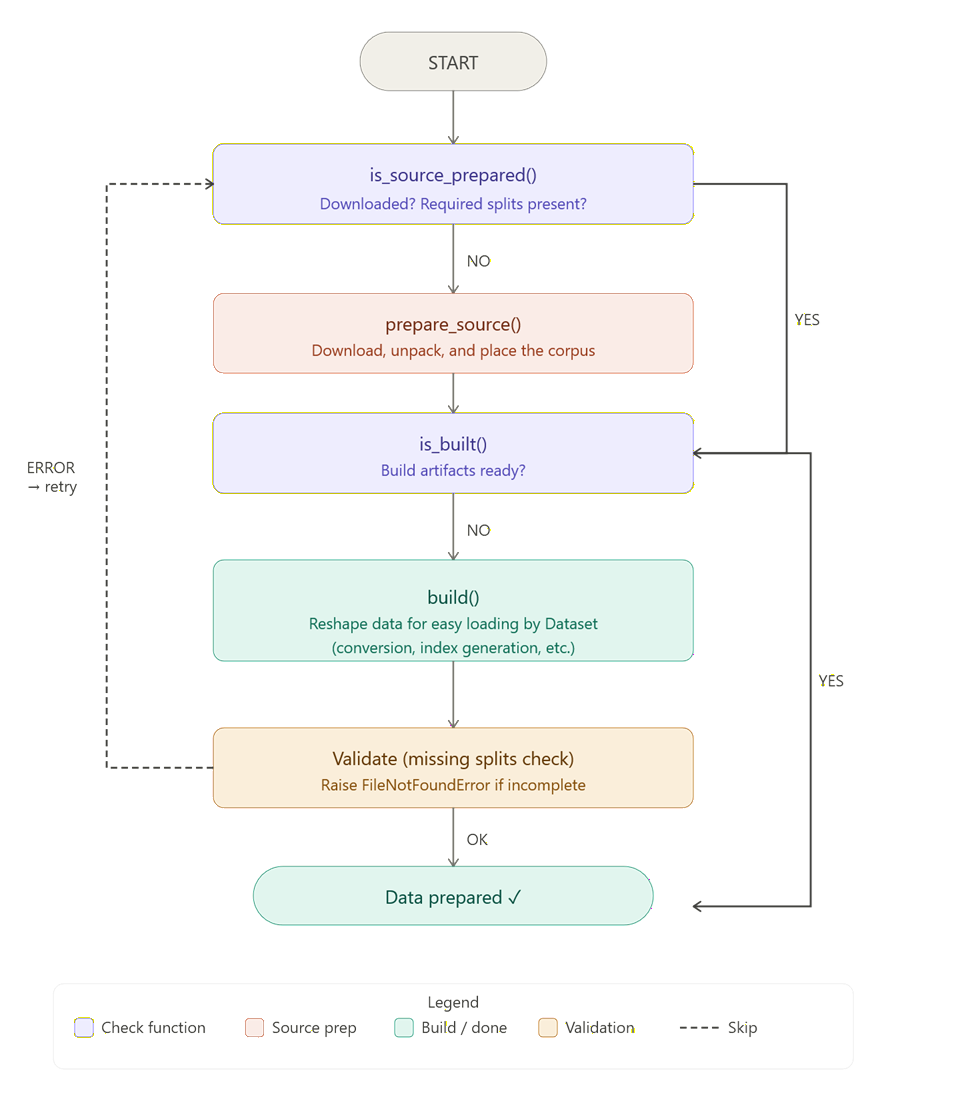
create_dataset runs these checks in order:
is_source_prepared()prepare_source()if neededis_built()build()if needed
So builder.py is not just for downloads. It is the standard contract for dataset readiness and artifact generation.
Even if the source data already exists in usable form, the builder should still implement the readiness checks and the final build step.
Minimal example:
from pathlib import Path

from espnet3.components.data.dataset_builder import DatasetBuilder


class MyBuilder(DatasetBuilder):
    def is_source_prepared(self, recipe_dir: str | Path, **kwargs) -> bool:
        recipe_dir = Path(recipe_dir)
        return (recipe_dir / "downloads" / "my_corpus").is_dir()

    def prepare_source(self, recipe_dir: str | Path, **kwargs) -> None:
        recipe_dir = Path(recipe_dir)
        source_dir = recipe_dir / "downloads" / "my_corpus"
        source_dir.mkdir(parents=True, exist_ok=True)
        # Download, unpack, or validate the raw source tree here.

    def is_built(self, recipe_dir: str | Path, **kwargs) -> bool:
        recipe_dir = Path(recipe_dir)
        return (recipe_dir / "data" / "manifest" / "train.tsv").is_file()

    def build(self, recipe_dir: str | Path, **kwargs) -> None:
        recipe_dir = Path(recipe_dir)
        manifest_dir = recipe_dir / "data" / "manifest"
        manifest_dir.mkdir(parents=True, exist_ok=True)
        # Write train.tsv, valid.tsv, test.tsv, or other task-ready artifacts.
The simple mental split is:
prepare_source()handles raw source availabilitybuild()writes task-ready artifacts consumed byDataset
How to point config at the dataset
Training usually looks like:
dataset:
  train:
    - data_src_args:
        split: train
  valid:
    - data_src_args:
        split: valid
In normal recipes, dataset._target_ and dataset.recipe_dir are already filled by the base config, so local overrides usually only need the split entries.
If data_src is omitted, ESPnet3 loads:
${recipe_dir}/dataset/__init__.pyThen it uses the Dataset and DatasetBuilder classes exported from that module by default.
Typical __init__.py:
from .builder import MyBuilder as DatasetBuilder
from .dataset import MyDataset as Dataset
So when data_src is not set, the local recipe dataset package becomes the default source for both dataset loading and create_dataset preparation.
What about test data?
Inference usually defines named test sets:
dataset:
  test:
    - name: test
      data_src_args:
        split: test
name becomes the output subdirectory name under inference_dir. As with training, _target_ and recipe_dir are usually inherited from the default config.
Collate functions still help a lot
A plain torch.utils.data.Dataset does not mean you lose ESPnet conveniences.
You can still use ESPnet collate functions such as:
espnet2.train.collate_fn.CommonCollateFn- CommonCollateFn reference
That means you still get useful behavior like:
- automatic padding
- automatic
{key}_lengthsentries such asspeech_lengthsandtext_lengths - batch formatting compatible with many existing ESPnet models
So a common pattern is:
- dataset handles sample loading
- collate handles batch formatting
Online vs offline augmentation
ESPnet3 lets you choose both.
Online augmentation
Good places:
- directly in
dataset.py - in per-entry
transform - in shared
preprocessor
Use this when you want random augmentation every epoch.
Offline augmentation
Good place:
builder.py: build()
Use this when you want a cached derived dataset on disk.
A practical recipe for starting
If you want to add a new dataset quickly, do this:
- write a minimal
Dataset(torch.utils.data.Dataset) - make it return a small sample dict
- export
DatasetandDatasetBuilderfromdataset/__init__.py - connect
training.yamlandinference.yaml - keep
CommonCollateFnif it already works
Related pages
Data pipeline
Read the migration view of builders, datasets, augmentation, and collate.
Datasets
See the high-level dataset internals and recipe-local module layout.
Dataset references
See how `Dataset` and `DatasetBuilder` are resolved from recipe modules.
DataOrganizer
See how train, valid, and test datasets are wired from YAML.
Dataloader
See how collate functions, batching, and iter factories are configured.
Dataset Config
See the YAML format used to point training and inference at your dataset.