
ESPnet3 Collect Stats Phase Overview
ESPnet3 Collect Stats Phase Overview
In ESPnet2, there is a stage called "collect-stats" that precedes training. This stage serves two primary purposes:
- Collecting the lengths of acoustic features to enable dynamic batch size adjustment.
- Computing the global mean and variance of the acoustic features for normalization.
- Feature Length Collection
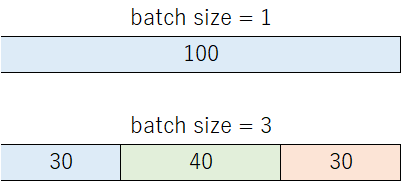
By precomputing the lengths of acoustic feature sequences, ESPnet2 could dynamically adjust batch sizes during training. For instance, if the maximum number of frames per batch was set to 100, a batch might contain 1 long utterance or 3 short ones. This helped mitigate out-of-memory (OOM) issues on GPUs.
Tips
If you want to see how these shape files affect actual batch construction, sampler selection, and dataloader behavior, read Dataloader Configuration.
In ESPnet3, the collect-stats stage is still present. It runs before training and writes the collected statistics under stats_dir so later stages (like training and normalization) can reuse them.
- Global Mean and Variance (Global MVN)
ESPnet2 often used GlobalMVN for acoustic features. The statistics were computed over the entire dataset in the collect-stats stage and applied during training. ESPnet3 computes these statistics in the collect-stats stage and saves them to stats_dir (e.g., ${stats_dir}/train/feats_stats.npz). If a user already has GlobalMVN statistics from a prior ESPnet2 project, ESPnet3 allows specifying these via configuration so that models can continue to use them.
When you are using ESPnet2 models with task set in train.yaml, put the normalization settings under model::
task: espnet3.systems.asr.task.ASRTask
model:
  normalize: global_mvn
  normalize_conf:
    stats_file: ${stats_dir}/train/feats_stats.npz
Or if you want to use GlobalMVN on your custom model, define it like this and Hydra will instantiate it automatically:
normalize:
  _target_: espnet2.layers.global_mvn.GlobalMVN
stats_file: /path/to/your/custom/stats_file.npz- Advanced Use Cases: GPU-based Stats Collection
Some research projects may involve complex features, such as using HuBERT or other pretrained models for representation extraction. In such cases, feature extraction and stats computation may need to run on GPU.
ESPnet3 provides a parallel execution API. See Provider/Runner for the parallel runner setup. Set parallel in train.yaml, then run the collect_stats stage as usual; the parallel backend will be used automatically.
parallel configuration:
parallel:
  env: slurm
  n_workers: 8
  options:
    queue: gpu
    cores: 8
    processes: 1
    memory: 16GB
    walltime: 30:00
    job_extra_directives:
      - "--gres=gpu:1"
Run:
python run.py --stages collect_stats --train_config conf/train.yamlIn summary, the collect-stats stage in ESPnet3 remains a dedicated step. Run it to compute feature shapes and global statistics, and it will save the outputs under stats_dir, for example:
${stats_dir}/train/feats_stats.npz
${stats_dir}/train/feats_shape
${stats_dir}/train/stats_keys